Yes, you absolutely can create a high-quality free real estate video, and you don’t need a film crew to do it. The secret is to transform your existing listing photos into a dynamic, cinematic tour. Modern AI-powered tools, like AgentPulse, are built for exactly this, letting you produce a professional video in just a few minutes—no cost, no complicated software, and no videographer needed.
Why Video Is No Longer Optional for Listings
In real estate today, video isn’t just a nice little bonus anymore. It's a core part of any smart listing strategy. Sellers and buyers have come to expect engaging content that tells a story static photos simply can't.
For sellers, seeing you use video shows you have a modern, effective marketing plan. For buyers, it creates a much deeper, more emotional connection to a property before they even step through the door.
The best part? You don't need a huge budget to make it happen. Free tools have leveled the playing field, making it possible for any agent to turn great photos into a captivating video tour. We're not talking about a clunky slideshow, either. This is about creating a polished marketing asset that grabs attention and drives real engagement from day one.
The Undeniable Impact of Video
This shift towards video isn't just a fleeting trend; it’s backed by some pretty convincing data. Listings with video see a huge spike in interest, and homeowners are now actively looking for agents who use it.
Recent industry stats really highlight how much video moves the needle on inquiries, seller expectations, and even landing new clients.
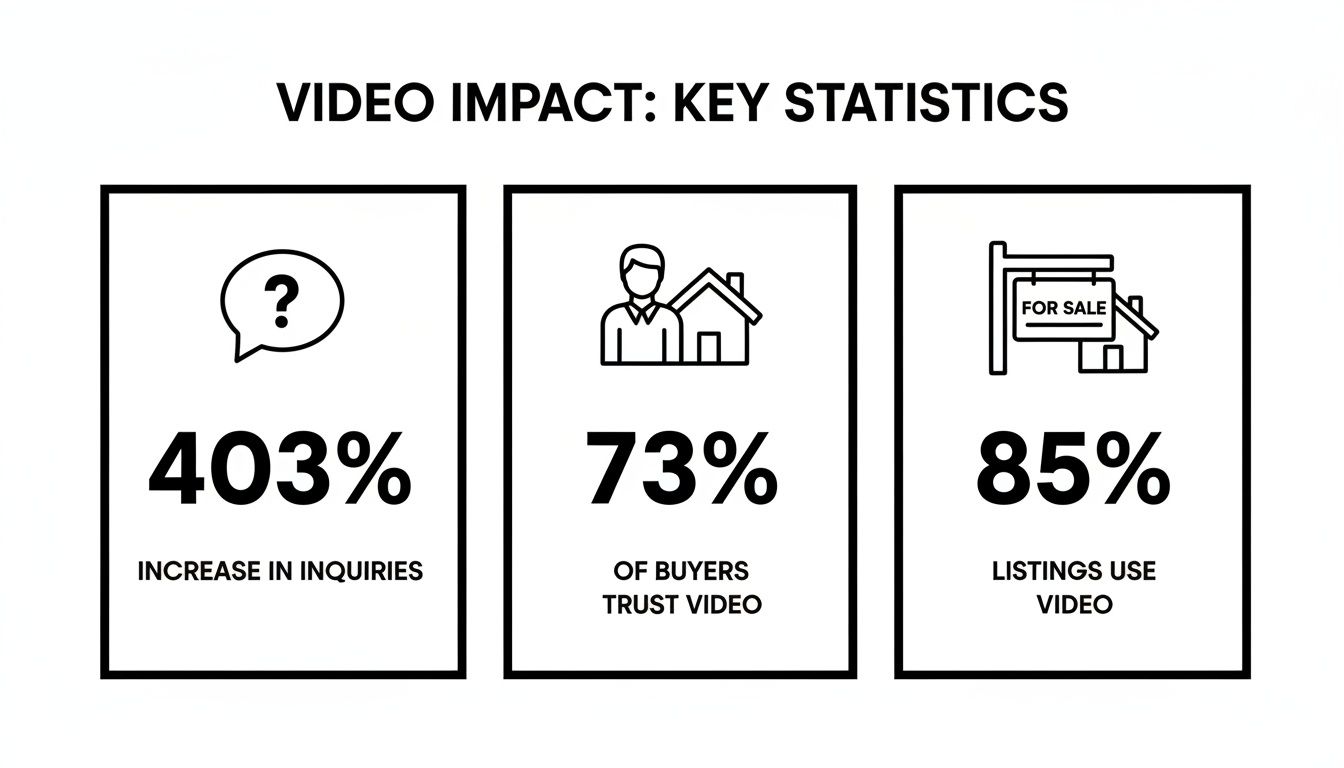
As you can see, adding a video isn’t a small tweak—it completely changes how a listing performs by drawing in more eyeballs and meeting the modern client's expectations.
The following table breaks down just how essential video has become in today's market.
Video Impact on Real Estate Listings
| Metric | Impact of Including Video |
|---|---|
| Increased Inquiries | Listings receive 403% more inquiries than those without video. |
| Seller Preference | 73% of homeowners are more likely to list with an agent who uses video. |
| Client Expectation | 85% of sellers now expect their agent to market their property with video. |
These numbers tell a clear story: video is a powerful tool for attracting both buyers and sellers.
A Modern Standard for Marketing
By now, a property video is just an expected piece of the marketing puzzle. A 2026 real estate report revealed that 73% of homeowners want to work with agents who use video, and a whopping 85% of sellers now expect a video for their property.
But the most compelling stat? Listings that include a video get an incredible 403% more inquiries than those that don't. That's a game-changer. You can dig into the full research on our blog: http://agentpulse.ai/blog/video-marketing-for-real-estate-agents.
Creating a free real estate video from your photos is more than a time-saver. It's a strategic move to meet market demands, secure more listings, and generate qualified buyer leads without increasing your marketing spend.
Knowing why video is so critical is the first step. To round out your marketing toolkit, it's also worth exploring other powerful lead generation tools for real estate agents that can work alongside your new videos.
How to Prepare Your Photos for a Cinematic Video
The quality of your free real estate video hinges entirely on the quality of your photos. Think of your images as the raw ingredients for a gourmet meal—the better the ingredients, the better the final dish. This isn't just about dumping a folder of pictures into a tool; it's about carefully choosing and arranging them to tell a story that pulls a buyer through the home.
The idea is to create a virtual walkthrough that feels natural. You want the video to flow just like a real-life tour: starting from the curb, stepping through the front door, moving through the living spaces and kitchen, exploring the bedrooms, and finishing out back. This narrative structure is what helps a potential buyer actually imagine themselves living there.
Selecting the Right Images
First things first, gather all your professional listing photos. And I mean high-resolution. This is non-negotiable. High-res images give the AI enough data to create smooth, crisp camera movements without looking blurry or pixelated. Sift through your collection and toss out anything that's fuzzy, poorly lit, or just a slightly different angle of a shot you already have.
You'll want to focus on photos that really sell the property's best features.
- The "Wow" Shot: Always lead with a stunning exterior photo. That first impression and curb appeal are everything.
- Unique Details: Don't forget the close-ups. Got a gourmet faucet, custom built-ins, or cool architectural details? Show them off.
- The Core Rooms: Make sure you have fantastic, well-composed shots of the kitchen, primary bedroom, and the main living area. These are the spaces where buyers make their decisions.
The industry data backs this up. By 2026, a staggering 98% of real estate professionals were already investing in professional photography, proving that high-quality stills are the bedrock of modern marketing. We already know that listings with pro photos can bump up social media shares by as much as 1,200%. Turning those same assets into an eye-catching video just multiplies their power, especially on platforms that favor motion. You can learn more about how these marketing trends are shaping the industry.
Arranging Photos for a Cohesive Flow
Okay, so you've cherry-picked your best shots. Now comes the critical part: arranging them in a logical order. The AI video tool is going to process these images in the exact sequence you give them, so this step is what separates a polished, professional tour from a random, jarring slideshow.
A well-sequenced set of photos tells a story. The AI can then add cinematic motion that enhances this story, making the home feel inviting and easy to navigate. Don't just show rooms; guide the viewer on a journey.
A sequence that works really well usually looks something like this:
- Front Exterior: A bright, welcoming shot of the front of the house.
- Entryway: A view from just inside the front door, inviting people in.
- Living Room: A smooth pan across the main gathering space.
- Kitchen & Dining: Show off the heart of the home where families connect.
- Primary Bedroom & Bath: Highlight the owner's private retreat.
- Backyard/Patio: End the tour with the outdoor living space, leaving a lasting impression.
Getting the photography right is a craft in itself. If you want to really nail this part, check out our guide on essential real estate photography tips for agents. A little prep work here makes a world of difference in your final video.
Bringing Your Free Real Estate Video to Life
Alright, you've planned your shots and prepped your photos. Now for the fun part—and believe me, it only takes a few minutes. This is where you get to see modern AI tools work their magic, turning that folder of static images into a polished, professional free real estate video without touching any complicated editing software.
The whole process is incredibly simple. Using a tool like AgentPulse's free tier, you just upload your high-res photos or drop in a share link. The platform pulls them in exactly the order you arranged, keeping that perfect narrative flow you worked so hard to create. All that prep work is about to pay off big time.
As you can see, the starting point is clean and designed to get your photos loaded up quickly. No fuss.
The Magic Behind the Cinematic Motion
So, what happens after you upload? This is where it gets really cool. The AI doesn’t just string your photos together into a slideshow. It analyzes each image to build a 3D model of the space, identifying walls, windows, ceilings, and other key features. This spatial awareness is what lets it create camera movements that feel real and immersive.
Instead of a clunky, automated pan or zoom, the AI generates movements that look like a professional videographer was actually there:
- Dolly-ins that smoothly pull the viewer into a room, focusing their attention.
- Panning shots that sweep across a living area to show off its size.
- Reveal shots that glide past a doorway to introduce the next space.
It’s this intelligent movement that transforms your photos into something truly cinematic. We dive deeper into the tech in our guide on how to convert photos into videos if you're curious about the nuts and bolts.
Think of the AI as your personal director and camera operator. It studies the composition of each photo and makes creative choices to guide the viewer’s eye, creating a sense of depth and presence that a simple photo gallery just can't match.
Adding the Finishing Touches
Before you hit the final button, you’ll add the essential property details. This is usually just a quick form where you input the key information you want displayed as text overlays in the video.
These are your video's "title cards," giving buyers the at-a-glance info they need. You’ll want to include:
- Property address
- Listing price
- Key stats (like 4 Beds, 3 Baths, 2,500 sq. ft.)
- Your name and contact info
Once that's filled out, you just click "generate." The AI takes over, rendering your project by combining the images, the custom camera movements, and your text into a final, polished video. From start to finish, you're looking at less than five minutes of work.
And if you’re someone who likes a little more hands-on control for final tweaks, you can always export the video and make small adjustments using one of the best video editing software for beginners.
Fine-Tuning Your Video for Maximum Impact
Getting the initial video generated is a great first step, but we’re not quite done. Now comes the fun part: turning that draft into a polished marketing piece that truly connects with buyers. A few thoughtful tweaks here are what will make your video look professional and feel custom-made for the home.
The first, and maybe most important, decision is the aspect ratio—basically, the shape of your video. This choice determines where your video will look its best. A one-size-fits-all approach just doesn't cut it anymore; a video that looks stunning on Zillow will get awkwardly cropped on an Instagram Story.
Choosing the Right Format for Each Platform
Every social media platform has its own vibe, and your video needs to fit in to be effective. Matching the format to the platform makes your content feel natural and professional.
Landscape (16:9): This is the classic widescreen format. It’s perfect for your MLS listing, a full-length YouTube tour, or embedding on your website. The wider view is fantastic for showing off a big backyard or the full scope of an open-concept living room.
Portrait (9:16): Think vertical. This is your must-have for Instagram Reels, TikTok, and Stories. It fills the entire phone screen, which is exactly what you need to stop someone from scrolling past your listing on social media.
Square (1:1): This is a solid, versatile choice for your main Instagram and Facebook feeds. It takes up a good amount of screen space without forcing people to turn their phones, making it a great middle-ground for everyday posts.
The goal isn’t just to post a video—it's to make it feel like it belongs there. Picking the right aspect ratio is the simplest way to make your content look more professional and get better engagement.
Setting the Right Mood with Music
Once you've picked the format, it's time to think about music. This is a detail that’s easy to overlook, but the soundtrack single-handedly sets the entire mood of your video. The right track can turn a simple series of photos into a genuinely emotional experience for a potential buyer.
What story are you trying to tell about this home?
For a high-end luxury property, a calm, elegant piano piece can create a feeling of sophistication and peace. On the other hand, if you're creating a quick teaser for social media, an upbeat, energetic track can build excitement and buzz.
Tools like the free tier from AgentPulse give you a library of royalty-free music to choose from, so you don't have to worry about copyright problems. Take a few minutes to listen to the options. Find a track that really fits the home’s personality. It’s these small, thoughtful touches that put you in control of the story and make your video a truly compelling ad.
Get Your Video Seen: A Guide to Attracting Buyers and Sellers
You’ve created a fantastic video. Now what? Getting it in front of the right eyeballs is just as important as the video itself. A great free real estate video needs a smart distribution plan to become a lead-generating powerhouse for your business.
This isn't about just posting it and hoping for the best. It's about being strategic and putting your new video exactly where your target audience spends their time—from the MLS to their social feeds and even their inbox.
Maximize Your Reach on Every Platform
Your first port of call should always be the Multiple Listing Service (MLS). It’s surprising how many agents skip this step. Embedding your video directly into the listing is the most effective way to guarantee that serious, motivated buyers—and their agents—see it.
Next up, social media. The key here is to post natively. Don't just drop a YouTube link on Facebook. Upload the actual video file as an Instagram Reel (using the 9:16 portrait format) or a Facebook post. The algorithms favor native video, which means better reach and more engagement. It’s the best way to stop the scroll.
Don't forget about your email list! It's an often-overlooked goldmine. While your organic social media posts might only reach 2%–5% of your followers, a good real estate email campaign can see open rates between 20%–30%. Sending your new video to your database is a simple way to get a massive boost in views. You can find more data on current real estate marketing trends to stay ahead of the curve.
The goal is to create a web of visibility. A buyer might first see your video on the MLS, see it again as they scroll through Instagram, and finally be prompted to take action when it lands in their email.
Write Captions That Convert
Your video is the visual hook, but the caption is what seals the deal. You’ll need to tailor your message for each channel.
- MLS Description: Keep it professional and straight to the point. Highlight the property’s best features and use language that resonates with other real estate agents.
- Instagram Reels: Go for short, punchy, and emotional. Use targeted hashtags like
#YourCityRealEstateor#DreamHometo help new people discover your listing. - Email Newsletters: Make it personal. Speak directly to your subscribers. You could even ask them to share it with someone they know who might be looking for a home just like this one.
To get started, here’s a quick-glance table to help you plan where and how to post your video.
Video Promotion Channel Strategy
| Channel | Best Format | Pro Tip |
|---|---|---|
| MLS Listing | 16:9 Landscape | This is your most important audience. Embed the video directly for agents and pre-approved buyers. |
| 9:16 Portrait (Reels) | Upload natively, add trending audio, and use 5-7 relevant local hashtags for maximum reach. | |
| 4:5 or 1:1 Square | Native video performs best here, too. Ask an engaging question in the caption to spark comments. | |
| 16:9 Landscape | Use an eye-catching thumbnail with a play button that links out to the full video on YouTube or Vimeo. | |
| YouTube | 16:9 Landscape | Optimize the title and description with the property address and keywords to show up in search results. |
Each channel serves a different purpose, but together they create a powerful, unified marketing push that gets your listing noticed.
Finally, think about putting a little money behind it. Paid social ads now have a 42% adoption rate among real estate pros for a reason—video ads work. Even a small, targeted budget can place your listing in front of thousands of potential local buyers, turning your free video into a direct pipeline for qualified leads.
Common Questions About Free Real Estate Videos
When you hear “free real estate video,” I know what you’re thinking. It’s natural to be a little skeptical. Is the quality any good? What’s the catch? Let's clear the air and tackle the most common questions agents ask, so you can start making videos with total confidence.
The first question is always about quality. Can a video made from photos really look professional? Absolutely. As long as you start with high-resolution images, you’re golden. The AI in these tools is smart; it creates smooth, cinematic pans and zooms that mimic real camera work, making the final product feel much more dynamic than a basic slideshow.
Can I Use These Videos Anywhere I Want?
Yes, and you absolutely should. Once you create and download that video, it’s yours. It's a marketing asset you can use everywhere, which is one of the biggest perks.
Think about all the places you can put it to work to get more eyes on your listing:
- Your MLS Listing: Upload it directly to give buyers and other agents an instant, engaging look at the property.
- Social Media: Share it as an Instagram Reel, a Facebook video, or even a YouTube short.
- Your Website: Embed the video right on your listing page to keep visitors engaged longer.
- Email Newsletters: Blast it out to your buyer list to announce the "just listed" property with a bang.
Best of all, the music included in these tools is typically royalty-free. That’s a huge weight off your shoulders—no worrying about your video getting flagged or taken down for copyright violations on social media.
When Should I Consider a Paid Plan?
The free versions are fantastic for getting started, and honestly, they're often more than enough for agents who just need a video here and there. But there are a few tell-tale signs that it’s time to upgrade.
You’ll know it’s time to move to a paid subscription when:
- You want to remove the watermark. A clean, unbranded video just looks more polished and professional. It puts your brand, not the tool’s, front and center.
- You need higher resolution. Paid plans usually unlock crisp 1080p HD or even 4K video, which looks incredible on larger screens.
- You're making videos all the time. If you're churning out content for multiple listings every month, the streamlined features and unlimited access of a paid plan will save you a ton of time.
Think of the free tier as your test drive. It lets you experience the power of video marketing without any risk. Once you see the boost in engagement and leads, investing a small amount in a paid plan to scale up becomes a no-brainer.
The whole point of a good free tool is to give you a powerful, cost-free way to get into video. It lets you produce impressive marketing materials that attract more buyers and wow your sellers, all without touching your budget.
Ready to turn your static listing photos into a captivating video tour in just minutes? With AgentPulse, you can create a professional, engaging, and completely free real estate video today. See how easy it is to make your listings stand out and attract more buyers.