If you're just getting started with video, the best video editing software is one that's easy to learn but powerful enough to grow with you. Our top picks include AgentPulse for its incredible AI automation, CapCut for creating social-ready videos on your phone, and DaVinci Resolve for a free desktop editor that’s surprisingly professional. The right choice really comes down to what you value most: speed, creative freedom, or your budget.
Finding the Right Video Editor for You
Jumping into video editing can feel overwhelming. The market is packed with tools, all claiming to deliver amazing results but often hiding a steep learning curve behind a cluttered interface. For a busy professional, the real challenge isn't just picking a tool—it's finding one that actually saves you time.
This guide skips the jargon-filled feature lists and gets straight to what matters for someone new to video. We're tackling the biggest hurdles you'll face: not enough time, the need for a polished look, and the desire to skip a month-long training course. We’ll look at each tool through the lens of what helps you get the job done right.
Core Evaluation Criteria
To figure out the best fit, we're comparing these editors based on four key areas that have a direct impact on your workflow and the final product:
- Ease of Use: How fast can a total novice make a good-looking video? We’re talking intuitive design, simple drag-and-drop controls, and a logical workflow.
- Speed and Efficiency: How long does it take to get from a folder of clips to a finished video? This covers everything from the editing process to rendering times and the role of automation.
- Practical Features: Does the software actually solve common problems for beginners? Think AI assistance, ready-to-use templates, and access to stock music or footage.
- Overall Value: When you weigh the price against the features, does the software deliver a solid return on your investment of both time and money?
To give you a quick snapshot, the table below summarizes our top picks. It’s a great starting point for seeing how they stack up before we get into the details of each one.
Key Insight: The "best" software isn't about having the most features. It's about finding the one that creates the smoothest path from your initial idea to a professional video you're proud to share.
Beginner Video Editor Quick Comparison
This table offers a high-level summary of our top recommended video editing software for beginners. It’s designed to help you quickly compare the most critical factors and find a tool that aligns with your professional goals.
| Software | Best For | Learning Curve | Key Feature | Pricing Model |
|---|---|---|---|---|
| AgentPulse | Automated property videos | Minimal | AI-driven cinematic motion | Freemium/Subscription |
| CapCut | Mobile social media content | Low | Trend-based templates & effects | Free (with in-app purchases) |
| DaVinci Resolve | Aspiring professionals on a budget | High | Professional color grading tools | Free (with paid Studio version) |
| iMovie | Apple users needing simple edits | Very Low | Seamless Apple ecosystem integration | Free (on Apple devices) |
Each of these tools excels in a different area. Your specific needs—whether it's creating property tours on the fly or editing a high-quality interview for your website—will point you to the right choice.
Why Do Traditional Video Editors Feel So Complicated?
If you've ever opened a professional video editor for the first time, you know that sinking feeling. It’s a chaotic jumble of tiny icons, multiple timelines, and menus with what seems like a million drop-down options. It's enough to make you want to slam your laptop shut, and trust me, you're not alone.
This kind of software was built from the ground up for filmmakers and visual effects artists—people who spend their entire careers mastering the craft. They need absolute control over every single frame, which demands a complex, feature-packed interface. But for someone who just wants to create a clean, professional video without a film degree, that complexity is a massive roadblock.
This gap is a huge deal in the video editing software market, a space valued at $3.09 billion globally in 2023. While giants like Adobe Premiere Pro command 35% of the market, its interface reportedly overwhelms 70% of new users. That frustration is real, leading beginners to waste 40% more time on complicated software when they could be using something simpler. You can find more on these trends over at Sendshort.ai.
The Timeline Is a Tyrant
At the heart of nearly every traditional editor is the timeline. It’s a multi-layered canvas where you line up video clips, audio tracks, text, and effects. It's incredibly powerful, but it's also where most of the confusion starts for newcomers.
Trying to manage all those layers can feel like juggling. You might have one track for your main video, another for background music, a third for your voiceover, and even more for text, logos, or transitions. Getting them all to play nicely together requires a level of precision that you only get with practice.
One wrong move—like accidentally nudging a clip out of sync with its audio—can set off a chain reaction of issues that a beginner will have a tough time fixing. It's the digital equivalent of a tangled ball of yarn, and it’s where most people get stuck.
Drowning in a Sea of Tools
The other major hurdle is just the sheer volume of tools thrown at you all at once. Professional software is loaded with hundreds of options for color correction, audio mixing, motion tracking, and more.
- Color Grading: Tools with names like color wheels, vectorscopes, and waveform monitors are essential for filmmakers. For the rest of us? We just want our video to look bright and clear without a PhD in color theory.
- Audio Mixing: Pro editors give you complex audio mixers with equalizers and compressors. That’s complete overkill when all you really need to do is fade your music in and out.
- Keyframing: This feature lets you animate elements with precision, but it involves setting manual start and end points for every tiny movement. It's a tedious, unintuitive process for creating a simple animation.
The bottom line: Traditional software forces beginners into a professional-grade cockpit when all they really need is a simple dashboard. The steep learning curve is enough to scare many people away before they even get started.
The time it takes to learn these tools is no joke. Just mastering the basics—cutting clips, adding transitions, and mixing audio—can take weeks of watching tutorials. For a busy professional, that's time you just don't have. This is exactly why a new wave of simpler, AI-assisted editors has appeared, focusing on getting the job done quickly instead of offering a million features you’ll never touch.
Comparing the Top Video Editors for Real-World Use
Forget generic feature lists. The best video editing software for a beginner isn't about having the most buttons or effects; it's about getting the job done with the least amount of friction. To figure out which tool is right for you, we need to look past the marketing and see how they actually perform when you’re on the clock.
Let’s put these editors to the test with a few everyday tasks that you'll actually face as a real estate agent. We'll compare the workflows side-by-side to really highlight the differences in speed, ease of use, and the final look.
Scenario 1: Creating a 60-Second Property Showcase
The goal here is simple: take a folder of high-quality photos and a few video clips and turn them into a dynamic, polished video tour of a property. It needs to look professional, complete with smooth camera movements, your branding, and some nice background music.
With a Traditional Editor (like DaVinci Resolve or iMovie):
First, you’ll import all your media into the program. Then, you start dragging each photo and clip onto the timeline one by one, arranging them in an order that makes sense. To make static photos look alive, you have to manually create movement using keyframes—a tedious process of setting start and end points for the zoom and position of each image.
Honestly, this part is a real time-sink. For a one-minute video with just 15 photos, you could easily burn 20–30 minutes just setting up these basic movements. After that, you still have to add transitions, drop in your logo, find and add a music track, and then manually adjust everything. For a newcomer, the whole thing can easily take over an hour.
With an AI-Powered Editor (like AgentPulse):
The experience here is night and day. You just upload all your photos and clips at once. The AI gets to work, analyzing each image and automatically generating slick, cinematic camera movements like pans, zooms, and reveals.
The Big Difference: AgentPulse’s AI completely automates the most boring part of the process—creating motion. What takes 30 minutes of painstaking manual work in a traditional editor is done for you in under a minute, and the result often looks more professional.
From there, you just add your branding, pick a song from the built-in music library, and let the platform stitch it all together. The entire process, from upload to having a downloadable HD video, often takes less than ten minutes.
Scenario 2: Turning Photos into a Social Media Reel
You’ve got a handful of great listing photos and need to whip them into a vertical, attention-grabbing Reel for Instagram or TikTok. It needs to be fast-paced, maybe use a trending effect, and have some text callouts for key features.
With a Mobile Editor (like CapCut):
This is where CapCut really shines. You can open the app and pick a trending template, which gives you a ready-made structure with music and effects already in place. All you have to do is drop your photos into the placeholders. It’s that easy.
If you want more control, you can build a Reel from scratch. The touch-based timeline is easy to use, and adding text, stickers, and transitions feels natural. CapCut's main advantage is how plugged-in it is to social media trends, so your content feels right at home on the platform. You can get this done in 15–20 minutes, easy.
With an AI-Powered Editor (AgentPulse):
The process with AgentPulse is just as fast but aims for a cleaner, more professional vibe instead of chasing trends. You upload your photos, and the software automatically formats the video for a vertical screen.
The AI-generated motion is already optimized for mobile, creating smooth visuals that look high-end. While you won't find the latest viral stickers, it ensures your branding is front and center and the final product feels like a premium property ad, not just another meme. This workflow is also incredibly fast, giving you a polished Reel in just a few minutes. To learn more about how this works, check out our guide on the best AI video generators.
Scenario 3: Adding Your Branding and a Call-to-Action
Your video is almost done, but you need to add the finishing touches: your logo, brand colors, and contact info at the end. This needs to look the same on every single video you make.
With a Traditional Editor:
In a program like DaVinci Resolve, you’d have to import your logo file and drop it onto a separate video track. Then you’d resize it, position it, maybe lower the opacity, and stretch it out for the right duration. For your contact info, you'd create text boxes, style the font, and time them to fade in at the end. You have to do this from scratch for every single project, which gets old fast.
With an AI-Powered Editor:
This is what platforms like AgentPulse were built for. You set up your branding—logo, name, contact details, brand colors—just once in your profile. After that, the platform automatically adds a professional intro and outro to every video you create. It's a "set it and forget it" system that saves time and keeps your branding perfectly consistent without you having to think about it.
This flowchart really simplifies the choice between a fast, automated workflow and a more hands-on, traditional one.
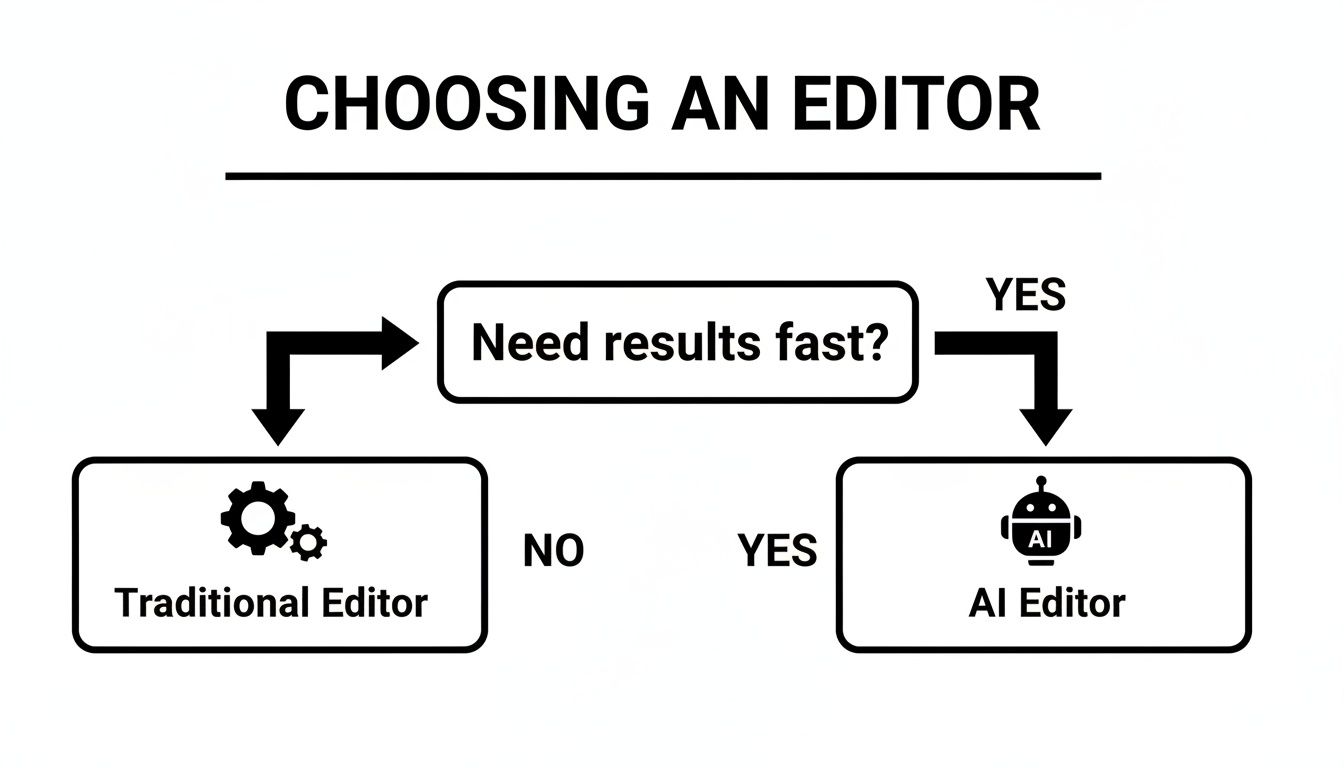
As the chart shows, the first question you should ask is how fast you need to get things done. Your answer will point you toward either an AI tool or a more traditional editor.
The Clear Divide in What People Actually Use
The market for video editing tools is huge, with North America alone making up over 36% of the global share. But a closer look at what people actually use tells an interesting story. Beginners naturally lean toward simple, free tools like iMovie (3% market share) and CapCut (4%).
On the other hand, incredibly powerful programs like DaVinci Resolve (15% share) have a massive dropout rate—as high as 60% of new users give up during the first week. This just goes to show that there's a huge need for tools that are easy to get started with, especially since 85% of businesses are now using video in the massive $224.13 billion video streaming industry.
As our scenarios make clear, the right choice really boils down to your priorities.
- Traditional editors give you total creative freedom, but you pay for it with a steep learning curve and a big time commitment.
- Mobile editors are fantastic for quick, trendy social media posts but might not give you the polished, high-end look you want for your brand.
- AI-powered editors are all about speed and consistency. They automate the grunt work so you can get professional-looking videos in minutes.
For a busy professional, the efficiency you get from an AI tool is a game-changer. It’s the perfect bridge for anyone who needs great video content but simply doesn't have the time to become a full-blown video editor.
Our Top Picks for Your Specific Needs

Finding the "best" video editor isn't about a one-size-fits-all answer. It’s about finding the right tool for your goals. After putting these options to the test, it's obvious they shine in completely different ways. Here's my breakdown to help you pick the right one.
Best for Maximum Speed and Automation: AgentPulse
If your main goal is to pump out professional-looking videos without sinking hours into the process, AgentPulse is hands-down the winner. It was built specifically to cut out the tedious, time-killing parts of video creation, like adding motion or keeping everything on-brand.
The whole process is dead simple: you upload your photos, and the AI does the heavy lifting. For busy professionals who need great content but don't have time to learn complex software, this is a lifesaver. You can go from photos to a finished property video in less than 10 minutes—a job that would easily take an hour or more in a traditional editor.
AgentPulse is for the real estate agent who values their time above all else. It lets you focus on selling properties, not on becoming a video editor.
Best Free Tool for Simple Projects: CapCut
For anyone wanting to create quick, fun content for social media without opening their wallet, CapCut is the go-to. It’s designed for your phone and is totally in sync with what’s trending on platforms like TikTok and Instagram. The app makes grabbing popular templates, effects, and audio tracks incredibly easy.
No, it won't give you the polished, cinematic look of an AgentPulse video, but that’s not what it’s for. CapCut is all about creating trendy Reels and short-form videos on the fly. Its easy-to-use interface and huge library of freebies make it the perfect starting point if your focus is 100% social media.
Best All-Around Editor for Long-Term Growth: DaVinci Resolve
If you’re ready to invest some time to learn a truly powerful tool that will grow with you, look no further than DaVinci Resolve. The free version is unbelievably powerful, packing in features that you’d normally pay a lot for. We're talking professional-grade color correction, audio mixing, and a full-blown editing timeline.
But let's be clear: all that power comes with a steep learning curve. This isn't a tool for banging out a video in five minutes. It's for the person who genuinely wants to learn the craft of video editing. If your ambition is to create highly customized, top-tier content down the road, starting with Resolve will give you an incredible foundation.
For a deeper dive into tools built for the industry, check out our guide on real estate video editing software.
Ultimately, your choice boils down to what you need most right now:
- You need it done fast and automatically? Go with AgentPulse.
- You need trendy mobile content for free? Download CapCut.
- You want to build real editing skills for the future? Start with DaVinci Resolve.
Your First Steps From Photos to a Polished Video
Knowing the difference between video editors is one thing, but seeing them in action is another. It makes the choice crystal clear. Let's walk through two different ways to tackle the same simple goal: turning a folder of property photos into a professional, engaging video for social media or an MLS listing.
This side-by-side comparison will show you the real-world gap between a modern, AI-assisted tool and a more traditional editor for beginners. You’ll see exactly how the path to a finished video can look wildly different.
Workflow 1: The AI-Powered Editor
This approach is all about speed and simplicity. The idea is to let the technology handle the heavy lifting so you can focus on what matters—the property itself. With a tool like AgentPulse, the process is incredibly direct.
- Upload Your Media: Just drag and drop your listing photos and any video clips you have into the editor. You don't even need to sort them first; the system figures that out.
- Add Key Details: Next, type in the essentials like the property address or a catchy headline. This info automatically gets turned into a clean title card or an overlay.
- Choose Your Vibe: Pick a music track from a library of royalty-free options. This is a huge time-saver and keeps you clear of any copyright headaches.
- Generate and Refine: Click one button. The AI gets to work, adding cinematic motion to your photos and syncing everything perfectly to the music you chose. A first draft is ready in minutes. Don't love it? Just click again to try a new style or song.
This workflow takes a task that could easily eat up an afternoon and shrinks it down to about 10 minutes. It's perfect for agents who need great-looking videos consistently, without becoming a part-time video editor.
The real magic of an AI workflow is efficiency. It automates the most tedious parts of video creation—like adding motion and timing clips to music—letting you produce professional content without the grind.
Workflow 2: The Traditional Beginner Editor
Now, let's try to build the exact same video using a standard, timeline-based editor like iMovie or a basic version of Filmora. These tools give you more manual control, but that control comes at the cost of your time and attention to detail.
This hands-on process offers a lot of creative freedom, but it requires a very methodical, step-by-step approach to get a polished result. For a lot of people just starting out, this is where things get overwhelming fast.
A Step-by-Step Manual Process
Here’s what that same project looks like in a traditional editor:
- Import and Organize: First, you import your photos and clips. Then, you have to drag every single file onto the timeline and arrange them in the order you want them to appear.
- Trim and Time Your Clips: Now the painstaking work begins. You have to go through each photo and decide how long it should stay on screen—a few seconds here, a few seconds there. For video clips, you have to trim the start and end points.
- Create Movement Manually: A static slideshow is boring, so you have to add motion to every photo. This is usually done with a "Ken Burns" effect or by manually setting start and end points for zooms and pans. This step alone can take a huge amount of time.
- Add Transitions and Text: To make it flow, you'll place transition effects (like a simple fade) between each clip. Then you’ll add text overlays for the property details and manually adjust the font, size, and position.
- Find and Mix Audio: You’ll need to go find royalty-free music on another website, download it, and import it into your project. Then you lay it on a separate audio track and manually adjust the volume so it doesn't overpower everything.
- Export Your Video: Finally, after all that work, you choose your export settings (resolution, file format) and wait for the video to render. Depending on your computer, this can take a while.
This manual process gives you total control, but it can easily take an hour or more for just one short video. It's a great way to learn the fundamentals of editing, but it's a massive time commitment. To better understand how video can elevate your marketing, learn more about creating compelling video for real estate listings and see how the right tools can make all the difference.
Still Have Questions About Video Editing Software? Let's Clear Them Up.
Even after comparing the options, picking your first video editing tool can feel like a big commitment. It’s the software that will shape your workflow and, ultimately, the quality of your video marketing. To help you make that final decision with confidence, I've answered some of the most common questions I hear from beginners.
Think of this as your final gut-check before you hit download. No jargon, just straight-to-the-point advice.
What’s Genuinely the Easiest Video Editor to Learn?
If you're starting from absolute zero, the easiest tool will be the one that doesn't overwhelm you with options. Editors like iMovie (on Mac) or CapCut (on your phone) are fantastic because you can pick them up and figure them out in an afternoon. Their interfaces are built around a simple drag-and-drop system, keeping all the complicated stuff out of sight.
But "easy" can mean different things. If your goal is to get a professional-looking video done fast, then an AI-driven tool like AgentPulse is probably the easiest. It handles the tricky parts for you—like adding motion or timing cuts to music—so you don't even have to learn those skills to get a great result.
The easiest software is simply the one that removes the most headaches. Whether it achieves that with a clean, simple layout or by automating the hard work for you, the goal is to get from raw footage to a finished video without pulling your hair out.
Can I Actually Get Professional Results with Free Software?
You absolutely can, but there’s always a catch. A powerhouse like DaVinci Resolve has a free version that’s more capable than many paid programs. You get access to professional-level color grading, audio engineering, and effects that can produce truly cinematic videos.
The trade-off is the brutal learning curve. To unlock that professional quality, you need to invest serious time learning a very complex piece of software. On the other end, free mobile apps like CapCut are great for social media videos, but they often lack the polished, on-brand look you need for a high-end property listing. The "price" of free software is almost always paid in your time.
How Much Should I Expect to Pay for a Good Editor?
The cost of beginner-friendly video software is all over the map, but it usually falls into one of three buckets:
- Totally Free: Tools like iMovie or the free version of DaVinci Resolve are legitimately powerful. The main limitations are that they might lock you into a specific operating system or demand a lot of time to master.
- Subscription (Freemium): This is the most popular model. You'll find tools like AgentPulse or CapCut that offer a free tier with some limitations (like a watermark or lower export quality). Upgrading to a paid plan, which usually costs between $10 and $30 a month, unlocks everything.
- One-Time Purchase: Some classic desktop editors like Filmora or Adobe Premiere Elements can be bought outright for a single payment, typically between $70 and $130. This can be a great deal if you know you’ll be using it for years to come.
When you're deciding, weigh the cost against the value of your own time. A monthly subscription that saves you hours of tedious editing every single week is often an investment that pays for itself.
Do I Need a Beast of a Computer to Edit Videos?
This really depends on the software you choose and what you’re trying to create.
Cloud-based editors like AgentPulse are a game-changer here. They do all the intensive processing on their own powerful servers, not your computer. That means you can create smooth, high-quality videos on just about any laptop with a decent internet connection. Similarly, mobile apps like CapCut are designed to run perfectly well on your phone.
On the other hand, traditional desktop software like DaVinci Resolve or Adobe Premiere Pro is incredibly demanding. If you go that route, you’ll want a machine with a fast processor, at least 16GB of RAM, and a dedicated graphics card. Without that, you'll be dealing with constant lag, slow rendering, and frustrating crashes.
Ready to skip the learning curve and create stunning real estate videos in minutes? AgentPulse uses AI to turn your property photos into cinematic, brand-consistent videos automatically. Try it for free and see how easy professional video marketing can be. Start creating with AgentPulse today